Setting up a Dynamic Web Site
THESE PAGES ARE STILL UNDER CONSTRUCTION AND DO NOT NECESSARELY REFLECT THE CURRENT VERSION OF TÓPICO
You can use Tópico to supply content to small multilingual dynamic web sites by editing topics in many languages. THIS TOPIC IS A WORK IN PROGRESS
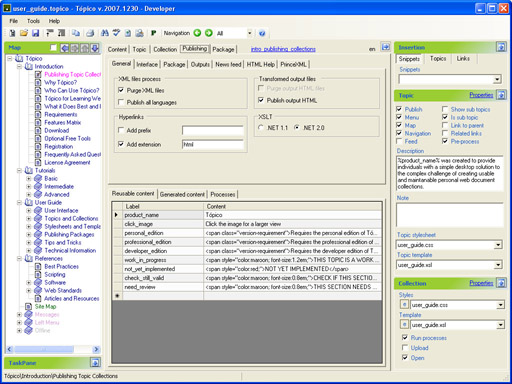
Hyperlinks options
When using Tópico in such a solution, you cannot create links to html pages while editing. What you want to do in this case is to create links to to topic id only. To make sure the links you create through the user interface (treeview or drop down list) do not target HTML pages, follow these steps:
- Select the Content tab;
- Right click on the Topics drop down list; (1)
- Select Add Extension from the pop up menu to remove the check mark.
(1) You can also toggle this option when you right click on any treeview node that is not currently selected.
Now that you link to topic ids only, you'll need to process these links to integrate with your custom solution. This will be done with a link prefix that is added to every link that targets a topic in the collection. FOllow these steps to add a link prefix:
- Select the advanced tab;
- Enable the option Add prefix;
- Enter the prefix you want to use for the links;
- Disable Add extension if necessary.
The following prefix could be used by a dynamic web site: page.aspx?xml=topic_id
Sample ASP.NET Visual Basic code
Here is some ASP.NET - Visual Basic code that reads a topic in the language (two letter code) contained in the variable Session.Item("language").
			Protected Sub Page_Load(ByVal sender As Object, ByVal e As System.EventArgs) Handles Me.Load
			Dim sXMLQ As String = Request.QueryString("xml")
			Dim sXSLQ As String = Request.QueryString("xsl")
			Dim sXML As String
			Dim sXSL As String
			Dim sXmlFile As String
			Dim sXslFile As String
			'load content according to language
			Dim sLang As String = Session.Item("language")
			'XML
			'get these values from the module var
			sXML = sXMLQ & "." & sLang & ".xml"
			'if file not found then try generic
			If Not File.Exists(Server.MapPath("xml/" & sXML)) Then
			sXML = sXMLQ & ".xml"
			End If
			'if file not found then try english
			If Not File.Exists(Server.MapPath("xml/" & sXML)) Then
			sXML = sXMLQ & ".en.xml"
			End If
			'missing content
			If Not File.Exists(Server.MapPath("xml/" & sXML)) Then
			sXMLQ = GetAppSetting("missing_content_id")
			sXML = sXMLQ & ".en.xml"
			End If
			'XSL
			sXSL = sXSLQ & "." & sLang & ".xsl"
			'if file not found then try generic
			If Not File.Exists(Server.MapPath("xsl/" & sXSL)) Then
			sXSL = sXSLQ & ".xsl"
			End If
			'if file not found then try english
			If Not File.Exists(Server.MapPath("xsl/" & sXSL)) Then
			sXSL = sXSLQ & ".en.xsl"
			End If
			'use default stylesheet if there is none specified
			If Not File.Exists(Server.MapPath("xsl/" & sXSL)) Then
			sXSLQ = "topic_to_html"
			sXSL = sXSLQ & ".xsl"
			End If
			'set the relative file name
			sXmlFile = "xml/" & sXML
			sXslFile = "xsl/" & sXSL
			Try
			'transform the file
			Xml1.DocumentSource = sXmlFile
			Xml1.TransformSource = sXslFile
			Catch ex As Exception
			End Try
			End Sub
THESE PAGES ARE STILL UNDER CONSTRUCTION AND DO NOT NECESSARELY REFLECT THE CURRENT VERSION OF TÓPICO