Run a script based on the current language
THESE PAGES ARE STILL UNDER CONSTRUCTION AND DO NOT NECESSARELY REFLECT THE CURRENT VERSION OF TÓPICO
In this tutorial, you'll learn how to run different part of a script based on the currently selected language. This feature could be useful in a setting where you want to copy the output folder (collection/online) to a different location based on the selected language.
Adding the language parameter to the script process
To send the current language as a parameter to a script, you need to add the %language% tag as the script parameter. See the image below.
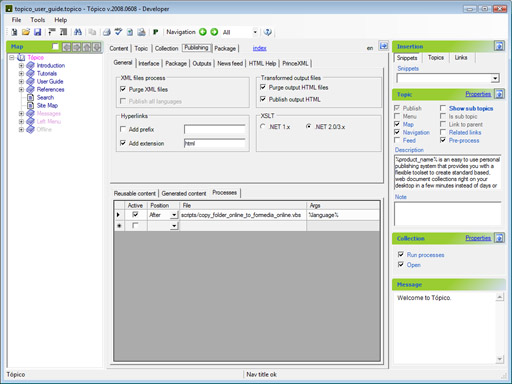
Once this step is completed; you'll need to edit the script to for it to read this parameter.
Edit the script to used the language parameter
In the script below, after setting a default language on line 7 in case the script is called without one, the language parameter is read on line 11 and used on line 14 and 16. You can use as many language as you want with your collection.
Option Explicit

'script parameters
dim args
set args = wscript.arguments
dim sLanguage
sLanguage = "en" 'default language

'language is first argument
if args.Count > 0 then
 sLanguage = args(0)
end if

if sLanguage = "en" then
 'Do English stuff
elseif sLanguage = "fr" then
 'Do French stuff
end if
THESE PAGES ARE STILL UNDER CONSTRUCTION AND DO NOT NECESSARELY REFLECT THE CURRENT VERSION OF TÓPICO